Google Tag

Thursday, March 23, 2023

How to copy your Messenger profile link on Android phone device - QRSocial App for Android.

Download my Android Apps!
Κατεβάστε τις Android εφαρμογές μου!


To download from Google Play scan QR Codes or click the banners.
Για να κατεβάσεις τις εφαρμογές σάρωσε τους QR Codes ή πάτα στις εικόνες.


How to copy your Messenger profile link on Android phone device

STEP 1

Open Messenger App on your Android phone device.


STEP 2

Tap on menu icon.


STEP 3

Tap on settings icon.


STEP 4

Tap on Username.
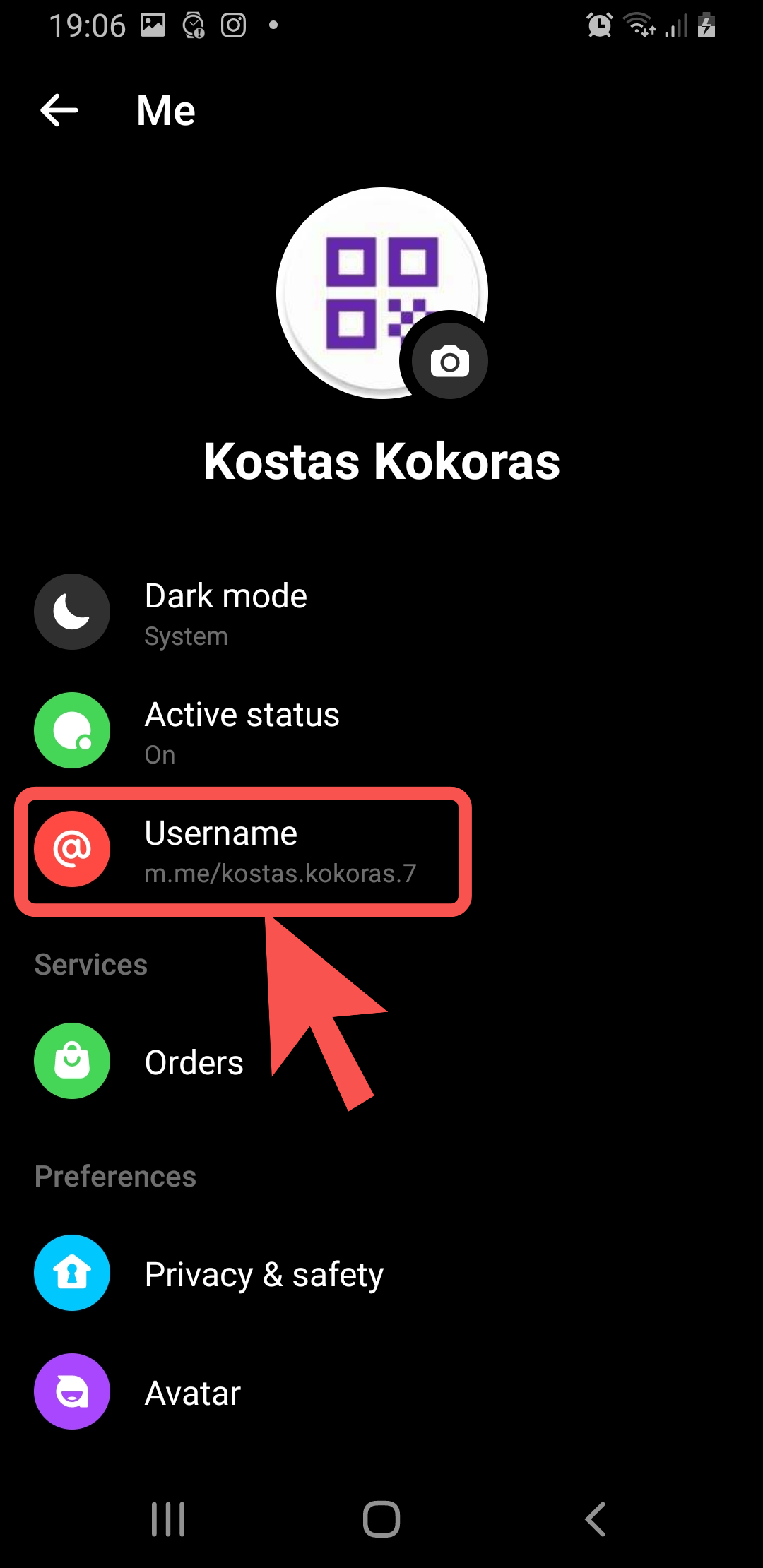


STEP 5

Tap on Copy link.


STEP 8

Paste the copied profile link to QRSocial App for Android and tap Save.


Disclaimer

Your profile link and your QR Code is private, when you share it with others, they can view or add your profile.

How to copy your Snapchat profile link on Android phone device - QRSocial App for Android.

Download my Android Apps!
Κατεβάστε τις Android εφαρμογές μου!


To download from Google Play scan QR Codes or click the banners.
Για να κατεβάσεις τις εφαρμογές σάρωσε τους QR Codes ή πάτα στις εικόνες.


How to copy your Snapchat profile link on Android phone device

STEP 1

Open Snapchat App on your Android phone device.


STEP 2

Tap on your profile image.


STEP 3

Tap on Share icon on the right top of the screen.


STEP 4

Tap Copy on the left bottom of the screen.


STEP 5

Your Snapchat profile link is now copied.


STEP 6

Paste the copied profile link to QRSocial App for Android and tap Save.


Disclaimer

Your profile link and your QR Code is private, when you share it with others, they can view or add your profile.

How to find your TikTok username on Android phone device - QRSocial App for Android.

Download my Android Apps!
Κατεβάστε τις Android εφαρμογές μου!


To download from Google Play scan QR Codes or click the banners.
Για να κατεβάσεις τις εφαρμογές σάρωσε τους QR Codes ή πάτα στις εικόνες.


How to find your TikTok username on Android phone device

 STEP 1

Open TikTok App on your Android phone device.


STEP 2

Tap profile icon in the lower-right corner of the bottom menu bar.


STEP 3

On your profile page, tap your TikTok username located at the middle of the page under your profile photo.


STEP 4

Your TikTok useranme is now copied.


STEP 5

Paste the copied TikTok username to QRSocial App for Android and tap Save.


Disclaimer

Your profile link and your QR Code is private, when you share it with others, they can view or add your profile.

Wednesday, March 15, 2023

How to fill in your phone number for your WhatsApp and Viber profile links - QRSocial App for Android

Download my Android Apps!
Κατεβάστε τις Android εφαρμογές μου!


To download from Google Play scan QR Codes or click the banners.
Για να κατεβάσεις τις εφαρμογές σάρωσε τους QR Codes ή πάτα στις εικόνες.


How to fill in your phone number for your WhatsApp and Viber profile links

STEP 1

Type your full mobile phone number in international format. Omit any zeroes, brackets, plus "+" symbols or dashes when typping the phone number in international format.

Example 1:

If your mobile phone number is +86-155-xxxxxxxx,

Type 86155xxxxxxxx


Example 2:

If your mobile phone number is +1-555-xxxxxxx,

Type 1555xxxxxxx


Example 3:

If your mobile phone number is +30-697-xxxxxxx,

Type 30697xxxxxxx

STEP 2

Tap Save icon


Disclaimer

Your profile link and your QR Code is private, when you share it with others, they can view or add your profile.

Saturday, March 11, 2023

How to copy your YouTube channel link on Android phone device - QRSocial App for Android.

Download my Android Apps!
Κατεβάστε τις Android εφαρμογές μου!


To download from Google Play scan QR Codes or click the banners.
Για να κατεβάσεις τις εφαρμογές σάρωσε τους QR Codes ή πάτα στις εικόνες.


How to copy your YouTube channel link on Android phone device

STEP 1

Open YouTube App on your Android phone device.


STEP 2

Tap on your profile image


STEP 3

Tap on Your Channel


STEP 4

Tap on channel settings


STEP 5

Tap on Channel URL


STEP 6

Paste the copied profile link to QRSocial App for Android and tap Save.


Disclaimer

Your profile link and your QR Code is private, when you share it with others, they can view or add your profile.

How to copy your LinkedIn profile link on Android phone device - QRSocial App for Android.

Download my Android Apps!
Κατεβάστε τις Android εφαρμογές μου!


To download from Google Play scan QR Codes or click the banners.
Για να κατεβάσεις τις εφαρμογές σάρωσε τους QR Codes ή πάτα στις εικόνες.


How to copy your LinkedIn profile link on Android phone device 

STEP 1

Open LinkedIn App on your Android phone device.


STEP 2

Tap on your profile image.


STEP 3

Tap on "View Profile" under your name.


STEP 4

Tap the three dots.


STEP 5

Tap on Contact info.


STEP 6

Tap on Your Profile.


STEP 7

Tap on Copy.


STEP 8

Paste the copied profile link to QRSocial App for Android and tap Save.


Disclaimer

Your profile link and your QR Code is private, when you share it with others, they can view or add your profile.

Wednesday, March 01, 2023

How to find your Instagram username on Android phone device - QRSocial App for Android.

Download my Android Apps!
Κατεβάστε τις Android εφαρμογές μου!


To download from Google Play scan QR Codes or click the banners.
Για να κατεβάσεις τις εφαρμογές σάρωσε τους QR Codes ή πάτα στις εικόνες.


How to find your Instagram username on Android phone device 

STEP 1

Open Instagram App on your Android phone device.


STEP 2

Tap your profile photo in the lower-right corner of the bottom menu bar.


STEP 3

On your profile page, take note of your Instagram username located at the top of the page.


STEP 4

Type in your Instagram username to QRSocial App for Android and tap Save.


Disclaimer

Your profile link and your QR Code is private, when you share it with others, they can view or add your profile.